
Introduction
Music production has changed dramatically over the last two decades. Today, anyone with a computer and creativity can create professional-quality music from home. One of the biggest reasons for this transformation is the rise of the Digital Audio Workstation. Whether you want to produce songs, edit podcasts, record vocals, or compose soundtracks, a Digital Audio Workstation makes the process easier and more professional.
For beginners, entering the world of music production can feel confusing. There are countless software options, technical terms, and production techniques to understand. However, learning the basics becomes much simpler once you understand how a Digital Audio Workstation works and why it matters. Instead of using expensive recording studios, musicians and creators can now handle almost every part of production directly from their computer.
A Digital Audio Workstation is not just for professional music producers. Content creators, voice-over artists, video editors, and independent musicians also rely on this software daily. From recording audio to mixing and mastering tracks, it offers powerful tools that improve workflow and creativity.
In this guide, you will learn what a Digital Audio Workstation is, why it is important, how to use it step by step, its benefits, disadvantages, common mistakes, expert tips, and answers to frequently asked questions.
What is Digital Audio Workstation?
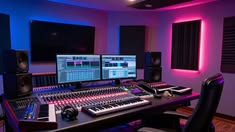
A Digital Audio Workstation is software designed to record, edit, arrange, mix, and produce audio files. In simple words, it acts like a virtual recording studio inside a computer.
Instead of relying on physical recording equipment alone, users can record instruments, vocals, podcasts, and sounds directly into software. A Digital Audio Workstation also allows users to add effects, adjust sound quality, and organize multiple tracks in one place.
Popular examples of Digital Audio Workstation software include programs used for music production, podcast editing, and soundtrack creation. Some are beginner-friendly, while others are designed for advanced professionals.
A Digital Audio Workstation normally includes features such as:
- Audio recording
- MIDI editing
- Virtual instruments
- Audio effects
- Mixing tools
- Mastering options
- Sound arrangement
For example, if a singer records vocals for a song, the recording can be edited inside the software. Background music can be added, sound quality improved, and effects such as reverb or echo applied.
In simple terms, a Digital Audio Workstation turns a regular computer into a complete music production setup.
Why is Digital Audio Workstation Important?
A Digital Audio Workstation plays an important role in modern audio creation because it gives users flexibility, speed, and professional-level tools.
First, it reduces the need for expensive recording studios. Independent artists can now create songs from home without spending huge amounts of money.
Second, it improves editing accuracy. Small mistakes in recordings can be fixed quickly. For example, if vocals sound too loud or instruments are out of balance, users can make adjustments instantly.
Another reason why a Digital Audio Workstation matters is accessibility. Beginners no longer need expensive hardware to start learning music production. Even basic systems can run lightweight production software.
It also increases creativity. Producers can experiment with beats, sounds, and instruments without limitations. A simple melody can turn into a complete song using digital tools.
In addition, a Digital Audio Workstation supports many industries, including:
- Music production
- Podcast editing
- Film sound design
- Video game audio
- Radio production
- Voice-over work
- Online content creation
Because of these advantages, a Digital Audio Workstation has become an essential tool for creators around the world.
Detailed Step-by-Step Guide
Step 1: Choose the Right Software
The first step is selecting a suitable Digital Audio Workstation based on your goals and experience level.
Beginners often prefer software with a simple interface, while professionals may choose advanced programs with detailed controls.
Before choosing software, consider:
- Budget
- Ease of use
- System compatibility
- Available features
- Learning curve
For example, someone interested in podcast editing may need simpler tools compared to a person producing electronic music.
Step 2: Install and Set Up Your Workspace
After selecting software, install it on your computer.
Next, organize your workspace for better productivity. This includes:
- Connecting headphones
- Setting up microphones
- Adding speakers if needed
- Installing audio drivers
- Creating project folders
A clean setup helps improve workflow and reduces distractions during recording.
Step 3: Learn the Interface
Every Digital Audio Workstation has a different design, but most include common sections.
Important areas include:
- Timeline
- Audio tracks
- Mixer panel
- Effects section
- Recording controls
- Editing tools
Spend time exploring these features before starting serious projects.
Step 4: Record Audio
Recording is one of the most important parts of music production.
To begin:
- Connect your microphone or instrument
- Create an audio track
- Adjust recording settings
- Press the record button
- Save the recording
Good microphone placement improves sound quality significantly.
Step 5: Edit Audio
After recording, editing becomes necessary.
Editing tasks include:
- Removing unwanted noise
- Adjusting timing
- Fixing mistakes
- Cutting unnecessary sections
- Improving sound clarity
For example, podcasters often remove background sounds to make conversations clearer.
Step 6: Add Effects and Plugins
Effects help improve sound quality.
Common effects include:
- Reverb
- Compression
- Equalization
- Delay
- Distortion
Plugins can also add virtual instruments such as pianos, drums, and guitars.
However, avoid overusing effects because too many adjustments can make audio sound unnatural.
Step 7: Mix the Audio
Mixing balances all sounds together.
During mixing, users adjust:
- Volume levels
- Stereo positioning
- Sound clarity
- Frequency balance
A good mix ensures every instrument sounds balanced.
Step 8: Master the Final Project
Mastering is the final stage.
This process improves:
- Loudness
- Clarity
- Consistency
- Overall listening quality
After mastering, export the final audio file in your preferred format.
Benefits of Digital Audio Workstation
A Digital Audio Workstation offers many benefits for beginners and professionals.
- Cost-effective compared to traditional studios
- Allows home recording
- Easy editing options
- Faster production workflow
- Supports multiple audio tracks
- Offers virtual instruments
- Improves sound quality
- Suitable for music, podcasts, and videos
- Encourages creativity
- Professional results with practice
Another major advantage is flexibility. Users can work anytime without depending on studio schedules.
Disadvantages / Risks
Although powerful, a Digital Audio Workstation also comes with challenges.
- High-quality software may be expensive
- Some systems require strong computer performance
- Learning curves can feel overwhelming
- Too many plugins may slow computers
- Audio files can consume storage space
- Poor mixing skills may reduce sound quality
Beginners often become frustrated because professional production takes patience and practice.
Common Mistakes to Avoid
Many beginners make avoidable mistakes when using a Digital Audio Workstation.
One common mistake is buying expensive software immediately. Beginners should first understand their needs before spending money.
Another mistake is ignoring audio quality during recording. Poor recordings are difficult to fix later.
Overusing effects is also common. Excessive reverb, bass, or compression can damage sound balance.
Many creators also skip learning shortcuts and workflow techniques. This slows down productivity.
Saving projects incorrectly can create problems too. Always back up important files.
Lastly, beginners often compare themselves with professionals too quickly. Music production takes time and consistency.
FAQs
1. What is the main purpose of a Digital Audio Workstation?
The main purpose of a Digital Audio Workstation is to help users record, edit, mix, and produce audio. It works like a digital recording studio for music, podcasts, and other sound projects.
2. Is a Digital Audio Workstation suitable for beginners?
Yes, beginners can easily start using a Digital Audio Workstation. Many programs include beginner-friendly features, tutorials, and simple interfaces for learning basic production skills.
3. Can I use a Digital Audio Workstation on a normal computer?
Yes, many systems work on regular computers. However, advanced music production may require better processors, memory, and storage for smooth performance.
4. Do I need expensive equipment?
No, expensive equipment is not always necessary. Beginners can start with headphones, a microphone, and basic software before upgrading later.
5. How long does it take to learn music production?
Learning depends on practice and dedication. Some beginners understand basics within weeks, while advanced production skills may take years to master.
6. Can a Digital Audio Workstation be used for podcasts?
Yes, podcast creators often use a Digital Audio Workstation for recording, editing, cleaning background noise, and improving sound quality.
Expert Tips & Bonus Points
If you want better results while learning a Digital Audio Workstation, follow these expert tips.
- Start with simple projects instead of complex productions.
- Learn keyboard shortcuts to improve speed.
- Practice audio mixing regularly.
- Keep project files organized.
- Use quality headphones for accurate listening.
- Watch tutorials to improve techniques.
- Experiment with different sounds and plugins.
- Avoid rushing the learning process.
Another useful tip is listening carefully to professional music. This helps beginners understand balance, clarity, and arrangement styles.
It is also smart to save multiple project versions. If mistakes happen, earlier work can be restored easily.
Consistency matters more than expensive equipment. Many successful creators started with basic setups and improved over time.
Conclusion
A Digital Audio Workstation has completely transformed how audio content is created. What once required expensive studios and complex hardware can now be done from a personal computer. Whether you dream of producing music, recording podcasts, editing voiceovers, or creating sound effects, this software opens countless creative possibilities.
For beginners, the learning process may seem difficult at first. However, understanding the basics of recording, editing, mixing, and mastering can make the journey much smoother. With patience and practice, anyone can gradually develop professional production skills.
One of the greatest strengths of a Digital Audio Workstation is flexibility. You can create, edit, and improve audio from almost anywhere. At the same time, modern tools make experimentation easier, helping creators discover unique sounds and styles.
Although there are challenges such as software costs and technical learning curves, the long-term benefits often outweigh the difficulties. By avoiding common mistakes, staying consistent, and learning step by step, beginners can improve faster than expected.
In the end, success with a Digital Audio Workstation depends more on creativity, dedication, and practice than expensive gear. The more time you invest in learning, the better your results will become.